Input assistance
Insert and check LAPMOD parameters through an organized interface.

Air dispersion modeling · Windows
The official graphical interface for the open-source LAPMOD model, covering input preparation, consistency checks, simulation support, postprocessing, and map-based visualization.
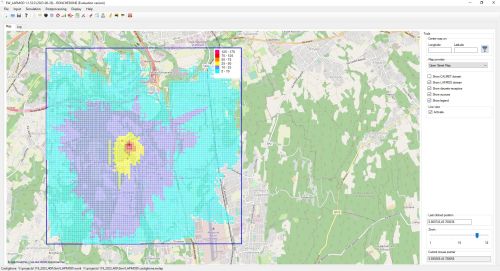
Model interface
EW_LAPMOD makes LAPMOD inputs and outputs easier to prepare, inspect, and reuse without hiding the scientific structure of the model.
The interface reads CALMET meteorological output prepared by the user or supplied through MeteoData. Sources and discrete receptors can be entered numerically or placed on the embedded map. Input consistency checks run before LAPMOD files are created.
After simulation, receptor concentration time series can be plotted and binary model output can be processed into annual averages, percentiles, running averages, and other required statistics.
Define particle-model sources, receptors, buildings, and emissions.
Merge multiple source definitions into one emission file.
View CALMET meteorology, terrain, and land-use information.
Plot receptors and produce gridded concentration statistics.
Capabilities
Insert and check LAPMOD parameters through an organized interface.
Configure constant, regular, and arbitrary time-varying source rates.
Automatically combine all configured sources into a single emission file.
Read building footprints and geometry from KML files.
Extract meteorology at any point and plot terrain and land use.
Plot receptor concentrations and display gridded results over the base map.
Project workflow
The GUI coordinates LAPMOD project components while retaining direct access to the open-source modeling system.
Interface
Place and configure model entities within the simulation domain.

Inspect meteorology, receptors, and concentration outputs geographically.
The Windows installer includes the interface and its PDF manual. LAPMOD itself remains available as an open-source modeling system.
Download evaluation →Use the two-month CALMET sample dataset or review current annual license terms.
Explore the model
The complete open-source modeling system, test cases, publications, and installation guides are available online.